Wednesday, 23 November 2016

This is specially for Indians

Increase your concentration power. This is specially for Indians.

Have you been frustrated because of mobile operators not listening to your complaints, not taking action or being unfair to you?

Here is a common sensical solution-

SMS PORT <Mobile no.> to 1900.

This will get you UPC(Unique Porting Code) which is used to port number from one mobile operator to another. It remains valid for 15 days.

After that you will get a barrage of calls from your operator asking why you want to leave them and port your number.

Tell them your problem and that if they don’t fix it within 15 days you will port your number to another mobile operator.

In most cases, they will solve your problem.


Image source:http://www.ibexmag.com/wp-conten...

Increase your concentration power


  • I'll share one small one minute hack which will increase your concentration power.


Take a pen.

Remove the cap.

Place the pen or hold it with your hand about 30 cm away from your eyes.

Stare at the tip of the pen. (Most important step)


Don't think about anything, just look at it.

Initially it'll be difficult (thoughts will come in your head, not able to concentrate properly) but practicing this will improve concentration.

NOTE : Don't stare for too long (approx. One minute), otherwise eyes will start straining.

Practice this exercise before doing any work which requires your full attention.

Tuesday, 22 November 2016

Make Keyboard Type (Any) Message Continuously

Make Your Keyboard Type (Any) Message Continuously - VBS Trick
This VBS trick can make any of your friend's keyboard type any message continuously. Open Notepad, copy the code given below and save the file as Tricks.vbs or *.vbs. You will need to restart your computer to stop this. Try this after closing all important programs.


 Set wshShell = wscript.CreateObject("WScript.Shell")
 do
 wscript.sleep 100
 wshshell.sendkeys "This is a Virus. You have been infected."
 loop
Send this file to your friends as an email attachment to see the fun .

Lesser known android Tricks:

Want to increase the performance of your android phone just in 1 minute ?

Follow these 1 minute hacks :


  • If your phone has amoled display then keep the wallpaper as black to save the battery.


  • To speed up charging put your phone on airplane mode, it will increase the rate of charging by 50%.


  • Change animation speed for faster performance, as if you decrease the scale it will take less time to open and close apps.(you need to enable developer options by clicking build number several times).Try keeping the scale below 1x to see effect. (Scale 1x is recommended for all three options)


  • Put limit on number of processes that will run in background then it will stop consuming extra data and rest of processes get killed.(you need to enable developer options by clicking build number several times)(max 3 processes are recommended )


  • By putting your phone in ceramic bowl the sound loudness will increase approx. by 30%.

image source- google images

Awesome Internet hacks:

  • Open any website and type this or copy-paste this URL (JavaScript code) in the URL BAR.
javascript:document.body.contentEditable=”true”;void 0;

Type this exactly as given (case sensitive). Now press enter and click anywhere on the website and type out anything. You will be able to type on the website as like a Wordpad document.

  • Open a youtube video. The URL looks something like
youtube[dot]com?watch=…

If you want to download this video in mp3, mp4, HD, 3gp, etc. Just put “10” before the URL. It should look like

10youtube[dot]com?watch=…

And press Enter. It will take you to a website where you can download youtube videos in any format.

  • Each and every website (except a few) contains a file named “robots.txt” . This text file actually directs search engines what page to be grabbed by the search engine spiders and what not. It directs what pages of a website should be allowed on search engines and what not. You can check any random website for this file by visiting like


Twitter


Want to know what technology a website uses? For a website like “example.com” Just visit
“http://builtwith[dot]com/example.com”

You can check Facebook technology profile here http://builtwith.com/facebook.com


And you can check any website as same.

You can see the HTML source code of a webpage easily on your mobile phone too (Android/Windows/iOS) if you have Google Chrome browser. Just put a prefix “view-source:” before the whole URL of the page in address bar and go. E.g. If you want to check HTML source code of Facebook, just type the whole URL putting the prefix like
view-source:http://facebook.com

For Google :

view-source:http://google.com

Typing and visting the URL chrome://restart in Chrome Browser, restarts Chrome after closing it.
Facebook doesn't allows one to post a blank status/comment/message. The post button remains inactive until you type in something. Even you can’t fool the system by typing spaces in the box. But you can override this system and fool it. Just type the following syntax in the status or comment box
@@[1:[0:1: ]]

and hit enter. The post will automatically be blanked once posted. Here's some screenshot with which I reported this bug to Facebook but it seems they don’t care as they neither replied back nor fixed it. (But try this once or twice. Don't play much with this otherwise Facebook may block your profile)


Monday, 21 November 2016

Unique Android tricks :

Unique Way to use your smartphone:

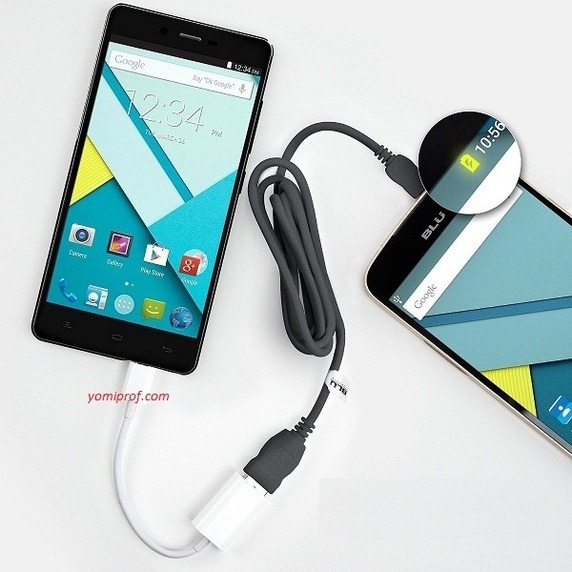
Thanks to USB OTG, you can expand your Android smartphone’s functionality in numerous ways, and use it to do extremely cool things . Some of us know it but most of us have used OTG to connect to Flash drive only.

Use Mouse and Keyboard with Android Phone

Tired of typing in that small screen of smartphone just connecting keyboard to your smartphone makes it so simple.


I have typed C programs,text documents,played games and done many interesting stuff with smartphone.


Gaming Controller


If you cannot buy PS3 or PS4 no problem just connect the controller through OTG and play awesome games. Play Asphalt8 , Real Racing, Modern Combat and Dead trigger etc.()

Other things to OTG can be connected to are

Ethernet


Printer


Create Music on Android with MIDI Controller Apps Using Musical Instruments


USB accessories like LED light , Fan , Selfie Stick ,Microphones.


Make the best use of your smartphone connect to USB hub and discover the endless possibilities.

Update 1:Transfer charge from one device to another.


All you have to do is connect the two phones, and the phone acting as the USB host (the one directly connected to the USB OTG cable) will start charging the other device.

Update 2:Control DSLR Camera with Android Smartphones.(soure:Google)


DSLR Cameras offer best in class image quality, complete with extensive manual controls, and a range of accessories. However, you can also control your DSLR camera and tweak its manual controls using your USB OTG connected Android phone, via numerous apps available for the same. One such app is DSLR Controller, which can be used to adjust focus, zoom control, shutter speed, ISO, and then some more, directly from the Android smartphone. It can even be used to record Time lapse videos.

Connect USB Modem with Android Mobile


Update 3: Fignerprint Scanner .

I came across this when I went to buy Relaince Jio Sim . The verification of the documents was done using the eKYC method to speed up the process. The sim was activated within 1 day because of this cool feature.


eKYC :- To simplify the process, eKYC uses your Aadhaar card to verify your details quickly. This is a service offered by the UIDAI, and enables businesses to quickly carry out KYC norms. To do so, you need to give the store you Aadhaar number, and then your fingerprint is scanned in the store and matched with the Aadhaar database to verify your identity.

Sunday, 20 November 2016

Turn your smartphone into a microscope

Turn your smartphone into a microscope!*

Purchase the shortest focal length lens you can find.  I used Thorlabs-LA1116 with adaptor Thorlabs-LMRA6, gluing the two together with clear nail polish (but any other adhesive will work).

​

Secure the optic to camera part of the phone, taking care not to obscure the field of view of either one.  Scotch tape around the edge of the small lens holder works fine (I personally use Fashion Tape, an awesome double-stick tape, cut into small rectangles).

​

Be amazed by the seemingly-mundane things around you!  This setup can resolve features several microns in size, depending of the optics inside your cellphone.  I found that this microscope setup works best when you have image stabilization turned on (because your hand will shake) and the setting which tries to get the entire field of view into focus turned off (the lens has a shallow depth of focus, so you won't be able to get everything in focus if you are looking at a curved object).


Cashmere


Denim


LED display, white screen


Nail polish


Packing foam

block websites without using any software

How to block websites without using any software:-

Want to block a website on your computer, then you just follow the simple step which is shown below. In this article you have to learn how to block any website with-out any software.

Follow the steps:

Step-1: 

At first Open “Run” from the start menu or press WinKey + R. Just copy paste the following path and press ENTER.

notepad %windir%\system32\drivers\etc\hosts

or

Go to C:\Windows\System32\Drivers\Etc and find the file “hosts”. Then open with notepad file.


Step-2:

When this hosts file is opened in Notepad, at the end of the file you will see something like “127.0.0.1 localhost”.

Step-3:

Under “127.0.0.1 localhost” just add another website URL that you want to block.

For Example:-

127.0.0.1 localhost

127.0.0.2 http://www(dot)abc(dot)com

127.0.0.3 http://www(dot)facebook(dot)com


127.0.0.1 (or Localhost) is the standard hostname given to the address of your computer. You mapped the website name to your PC, hence you can’t visit the site any more. So if you want to block Facebook, just add this line: 127.0.0.1 nytimes(d0t)com

Step-4:

Make sure every time you add another website, the last digit of the address 127.0.0.x should not be the same.

Step-5: 

Save the file and exit.

So, here you go. Restart your browser if it is opened and changes will take place immediately.


The good thing is that no message, no pop ups nothing will be displayed when someone tries to open a blocked website. Your browser will just fail to open those websites without any error messages.

Friday, 18 November 2016

Matrix Falling Code Effect

Matrix Falling Code Effect - Notepad CMD (.BAT) Tricks
Inspired by the movie Matrix, this falling code trick is extremely popular on social networking websites. Copy and paste the code given below in Notepad and save the file as "Matrix.bat" or *.bat.
@echo off
 color 02
 :tricks
 echo %random%%random%%random%%random%%random%%random%%random%%random%
 goto tricks


Upon running the bat file, you will see the "Matrix falling code" effect.

God Mode Folder

Now these are some computer tricks that will bring NO HARM to your PC
They will aid your day to day PC usage.
Cool Computer Tips And Tricks.
#God Mode Folder : Now before you jump into doing this, if you are using a windows vista 64-bit do not try this, as it will cause a reboot loop.

The windows hidden ''God Mode'' folder offers a control panel containing just about all the operating systems settings, this makes it easy for users to change or tweak settings, from scheduling tasks, add devices, change date and time and lots more.
With the God mode, you can easily access just about anything from just one folder, cool right? To access/activate the God Mode on your PC.
- Create a new folder on your PC
- Rename the folder to God Mode.{ED7BA470-8E54-465E-825C-99712043E01C}.
-
The folder icon will change to a control panel icon once renamed.
You can now tweak settings on your PC with total ease.

Use Google more efficiently

Use Google more efficiently
Search for content within the site:For example I’m searching for the topic android within the site ScoopWhoop in the pic below

·         Search for related sites:

Get direct links to pdf files on google(Replace pdf with other file types such as xls,ppt,etc). Just type
FILETYPE:pdf your pdf file name

Search direct links of your favourite mp3 songs.
intitle:index.of?mp3 Your song name here

Get direct links to download your favorite movies from google search by typing
+”index of””Your Movie Name” Release date

Enable the hidden Admin.

1.Enable the hidden Administrator account in WIN 7,8,8.1, and 10.
The Administrator account in WIN7 and later is disabled by default. It is a built in account which we cannot access for security reasons. However we may need the administrator account for carrying out troubleshooting operations,testing some potentially harmful software or carrying out networking tasks such as running apache servers which requires admin privileges. Here is a step by step guide to do that

Step 1: Open cmd by typing cmd on start menu search bar and running it as an administrator.

Step 2: In the command prompt type net user

As you can see there are two users one Administrator and another one is your user name.
The Administrator account is disabled by default. So, we are going to enable it by typing in the command prompt
net user administrator /active:yes

Now the admin account is having no password and any one can access it. Hence we are going to give a password by typing
net user administrator

Note: using this technique you can change the password of any user by typing(Asterisk will not appear in this case)
net user username *
for example my pc username is Kaushal
hence, I will be typing, net user kaushal *
To disable the admin account type
net user administrator /active:no

Next time when you restart your pc you will get two accounts. One consisting of username and another consisting of the administrator as shown in the pic below

Using administrator account you don’t have to run programs in admin mode by right clicking every time because all the programs running inside the admin account are running in admin mode by default. 

Tuesday, 15 November 2016

Creating Custom Search Engines in Chrome

Creating Custom Search Engines in Chrome:
Here is a trick, which you can learn in few minutes and hope it will be Greatly Useful & Time Savior (it helps me a lot). You might know this but if you don't, you should explore it.
Before using custom search you need to "create custom search".
1. Adding a Custom Search Engine:
The easiest way to open the search preferences window is to right-click (Mac: ctrl+click) in the address bar and select ‘Edit Search Engines…‘ – alternatively, you can also go toPreferences -> Default Search: Manage.


This opens up the Search Engines setting page as below:


Go to the Other Search Engines (bottom section). You’ll notice (to your big surprise?) that a lot of different search engines have already been added. This is because Chrome automatically adds search engines to the list after you search from a site. Most of the ones you’re looking to add are probably already there, but you need to change the keyword.
Otherwise, it’s pretty easy to add a search engine manually. You just need to supply the name, keyword and URL. Not simply the site URL, mind. You’ll need to show Chrome where to insert the search string.
To find the correct URL, simply launch a search on the site, and take a look at the address bar. You’ll need to replace your own search query with %s to create the search URL for Chrome. Perhaps even easier, you should be able to search for ‘%s’ on the site, and just copy the entire URL.
Just for illustration i will show you one custom search (which i use a lot), created for saving the YouTube Video to any required Format using.

Scroll down till the end, Type in "some name" for your search engine in first field (for example: Video Downloader, this will be appeared as header while searching). 


Type the Keyword (Only important thing you need to remember while searching later), lets say "video". Get the exact search format for that particular site, Type that in third field and replace the search query with "%s"
Once You are done, it will be added to your Custom Search List as below:


2. Using Custom Search Engine
Now Forgot everything what you have done so far for setting the search engine. Only thing you need to remember is associated keyword ("Remember Second Field".! video).
To use that custom search, type keyword in chrome address bar and hit "Space" key, and then type in your search query and hit enter. This will immediately redirect you to desired site and shows the search query.
Screenshot attached, using just created "video" keyword, and copied random YouTube video link as search query.


Voila.!!! You save it's video/audio whichever format you want to.


Want some search to be used extensively, make that engine DEFAULT, and then you don't even need the keyword. Just paste your query in the address bar (sounds familiar right? searching something on google, you just type search query right.! Because google is your default search engine).
3. For Some Complex Searches
For some complex search (where you don't have direct pattern to Search_URL), you can write some html script. Just pass the script path with proper arguments as: