Showing posts with label Mobilehacks. Show all posts

Tuesday, 22 November 2016

Lesser known android Tricks:

Want to increase the performance of your android phone just in 1 minute ?

Follow these 1 minute hacks :


  • If your phone has amoled display then keep the wallpaper as black to save the battery.


  • To speed up charging put your phone on airplane mode, it will increase the rate of charging by 50%.


  • Change animation speed for faster performance, as if you decrease the scale it will take less time to open and close apps.(you need to enable developer options by clicking build number several times).Try keeping the scale below 1x to see effect. (Scale 1x is recommended for all three options)


  • Put limit on number of processes that will run in background then it will stop consuming extra data and rest of processes get killed.(you need to enable developer options by clicking build number several times)(max 3 processes are recommended )


  • By putting your phone in ceramic bowl the sound loudness will increase approx. by 30%.

image source- google images

Monday, 21 November 2016

Unique Android tricks :

Unique Way to use your smartphone:

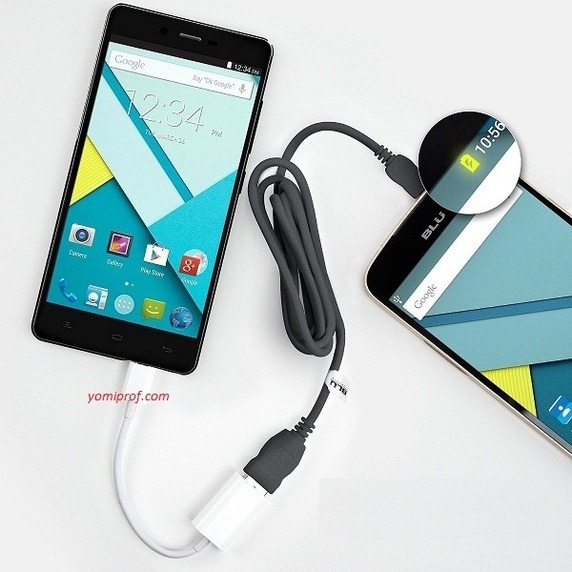
Thanks to USB OTG, you can expand your Android smartphone’s functionality in numerous ways, and use it to do extremely cool things . Some of us know it but most of us have used OTG to connect to Flash drive only.

Use Mouse and Keyboard with Android Phone

Tired of typing in that small screen of smartphone just connecting keyboard to your smartphone makes it so simple.


I have typed C programs,text documents,played games and done many interesting stuff with smartphone.


Gaming Controller


If you cannot buy PS3 or PS4 no problem just connect the controller through OTG and play awesome games. Play Asphalt8 , Real Racing, Modern Combat and Dead trigger etc.()

Other things to OTG can be connected to are

Ethernet


Printer


Create Music on Android with MIDI Controller Apps Using Musical Instruments


USB accessories like LED light , Fan , Selfie Stick ,Microphones.


Make the best use of your smartphone connect to USB hub and discover the endless possibilities.

Update 1:Transfer charge from one device to another.


All you have to do is connect the two phones, and the phone acting as the USB host (the one directly connected to the USB OTG cable) will start charging the other device.

Update 2:Control DSLR Camera with Android Smartphones.(soure:Google)


DSLR Cameras offer best in class image quality, complete with extensive manual controls, and a range of accessories. However, you can also control your DSLR camera and tweak its manual controls using your USB OTG connected Android phone, via numerous apps available for the same. One such app is DSLR Controller, which can be used to adjust focus, zoom control, shutter speed, ISO, and then some more, directly from the Android smartphone. It can even be used to record Time lapse videos.

Connect USB Modem with Android Mobile


Update 3: Fignerprint Scanner .

I came across this when I went to buy Relaince Jio Sim . The verification of the documents was done using the eKYC method to speed up the process. The sim was activated within 1 day because of this cool feature.


eKYC :- To simplify the process, eKYC uses your Aadhaar card to verify your details quickly. This is a service offered by the UIDAI, and enables businesses to quickly carry out KYC norms. To do so, you need to give the store you Aadhaar number, and then your fingerprint is scanned in the store and matched with the Aadhaar database to verify your identity.

Sunday, 20 November 2016

Turn your smartphone into a microscope

Turn your smartphone into a microscope!*

Purchase the shortest focal length lens you can find.  I used Thorlabs-LA1116 with adaptor Thorlabs-LMRA6, gluing the two together with clear nail polish (but any other adhesive will work).

​

Secure the optic to camera part of the phone, taking care not to obscure the field of view of either one.  Scotch tape around the edge of the small lens holder works fine (I personally use Fashion Tape, an awesome double-stick tape, cut into small rectangles).

​

Be amazed by the seemingly-mundane things around you!  This setup can resolve features several microns in size, depending of the optics inside your cellphone.  I found that this microscope setup works best when you have image stabilization turned on (because your hand will shake) and the setting which tries to get the entire field of view into focus turned off (the lens has a shallow depth of focus, so you won't be able to get everything in focus if you are looking at a curved object).


Cashmere


Denim


LED display, white screen


Nail polish


Packing foam

Tuesday, 27 September 2016

Difference phone tablet & phablet !


However, Screen size is common answer.. we mostly listen.. but, there is more then that.
but, for those who doesn’t know anything ,i’ll go with the basic thing.. :-
yes the screen size 1st:- as you see here
As you see here, The line between smartphones and tablets is fading, with many vendors and handset makers opting to release larger "phablets" rather than making a clearer distinction between the devices.
Because of this, many users can be perplexed about the advantages and disadvantages to owning a phablet over a smartphone and a tablet, and for those looking at the devices as a holiday gift the decision can be much tougher.
  • Device Usage
To make the best decision, it is important to keep in mind what the device or devices will be used for.
If you're someone who really only uses their phone for texting and making calls, then perhaps a larger screen size is not necessary. Not only that, but if you're looking for a device to occasionally watch a movie in bed with or read with at home, then maybe a smartphone and a tablet, separately, will serve you well.
  • Specs
Phablets often have the luxury of better specs. Apart from having larger displays, they are often flagship models, such as the Samsung Galaxy Note 4 or Google Nexus 6. Because of this, they are faster, have more storage and are simply better devices. This is, of course, a generalization that isn't always true, with many smartphones being just as capable, but it would be impossible to say that the extra size has no effect on specs.
Forecast chart showing.. people’s choice.. between them. :-
image source- google images
  • Conclusion
It is clear that deciding between a tablet and a smartphone essentially comes down to personal preference, but there are certainly reasons to go either way. The convenience of having all your data on one device is certainly a strong point, but so is the fact that smartphones can easily fit in your pocket and heavier media consumption can be saved for home. Either way, phablets are becoming more and more popular, and are likely to continue to do so for at least the next few years.

SEE  THE  FULL  POST  HERE  ON  MY  QUORA  ACCOUNT:-


Story behind IMEI number !

Story behind IMEI number !


GSM Association IMEI Allocation and Approval Guidelines
GSM Association have the following policy regarding Dual (or Multi) SIM phones:
If each SIM is associated with its own transceiver, then each transceiver/SIM should have its own associated IMEI number. i.e., a dual SIM phone should have 2 IMEI numbers; a three SIM phone should have 3 IMEI numbers etc.
If each transceiver is identical, then they can share the same TAC number, but must have different IMEI numbers. If the transceivers are different (e.g. they operate on different band frequencies), then a different TAC number and a separate TAC application is required for each transceiver/SIM combination.
If you cant understand everything heres a brief description:
The structure of the IMEI is the 8 digit TAC followed by a 6 digit serial number and a check digit. These 15 digits combine to make the full 15 digit IMEI as shown below.
So as nowadays Dual SIM Phones as generally DUAL SIM active i.e. have 2 separate transceivers so they need 2 separate IMEI numbers.
In my words Each transceiver module is identified by the IMEI number (International Mobile Station Equipment Identity) for GSM transceivers.
Here is, how IMEI works :-

image source : google images.

SEE  THE  FULL  POST  HERE  ON  MY  QUORA  ACCOUNT:-


Monday, 26 September 2016

Unlock PAttern Lock hack :D

Unlock Pattern Lock in 2 min :-

Whenever u’r mom, dad. sis, bro. or, your friend want to ask give them there mobile, or, u ask them to unlock there cell, they are not going to unlock in front of your eyes.
So, what you’ve to do is :-

1- clean the cell screen . by rubbing on u’r t-shirt or, top . what-ever soft clothe you’ve .


2- Put a very thin layer of “***Vaseline***” yes **Vaseline**.. put it on screen very delicately


It is how it will look,Then.

3- what happen is .. screen become very slippery and have moisture pores on it.4- So, when u hand-over them there cell and, when they move their figures to unlock it .. the screen make there exact copy on it..5- all you’ve to do is Just tilt the cell and, you’ve get the exact copy of there pattern..

As you see here.. :-
Now u can enjoy , By using this Every time.. :D
image Source :- google images , Bt, it actually looks like them.


SEE  THE  FULL  POST  HERE  ON  MY  QUORA  ACCOUNT:-

https://www.quora.com/What-are-some-interesting-smartphone-hacks/answer/Ankush-Gautam-7/log